
How to Delete an Instagram Account- There comes a time when many people decide to leave social media behind. Some become busy with work, while others want to spend more time with their family or focus on their studies. There are also people who simply feel that Instagram is taking up too much of their time.
Deleting your Instagram account is actually much easier than most people think. The only problem is that many users don’t know where to find the option because Instagram doesn’t place it on the main settings page.
In this guide, I’ll walk you through the complete process in simple words. Whether you want to delete your account forever or you’re still deciding, this article will help you understand everything before you make your final choice.
Things to Know Before You Delete Your Instagram Account
When you permanently delete your Instagram account, all of your photos, videos, reels, messages, comments, followers, and profile information will be removed. Once the deletion process is completed, you won’t be able to recover that data again.
If you’re only taking a short break from social media, deleting your account may not be the best option. In that case, temporarily deactivating your account is usually a better choice because your profile and content remain safe until you decide to come back.
Take a minute to think about what you really want. If you’re sure you no longer need your account, then continue with the steps below.
How to Delete an Instagram Account
Start by logging into the Instagram account you want to remove. Make sure you’re signed in to the correct account before moving to the next step.
After that, open the account settings and go to the Accounts Center. This is where Instagram keeps most account management options, including account deletion.
From there, you’ll find the option to remove your account permanently. Instagram may ask you to confirm your decision and enter your password before the request is accepted.
Step-by-Step Guide to Delete Your Instagram Account
Step 1: Open the Instagram App
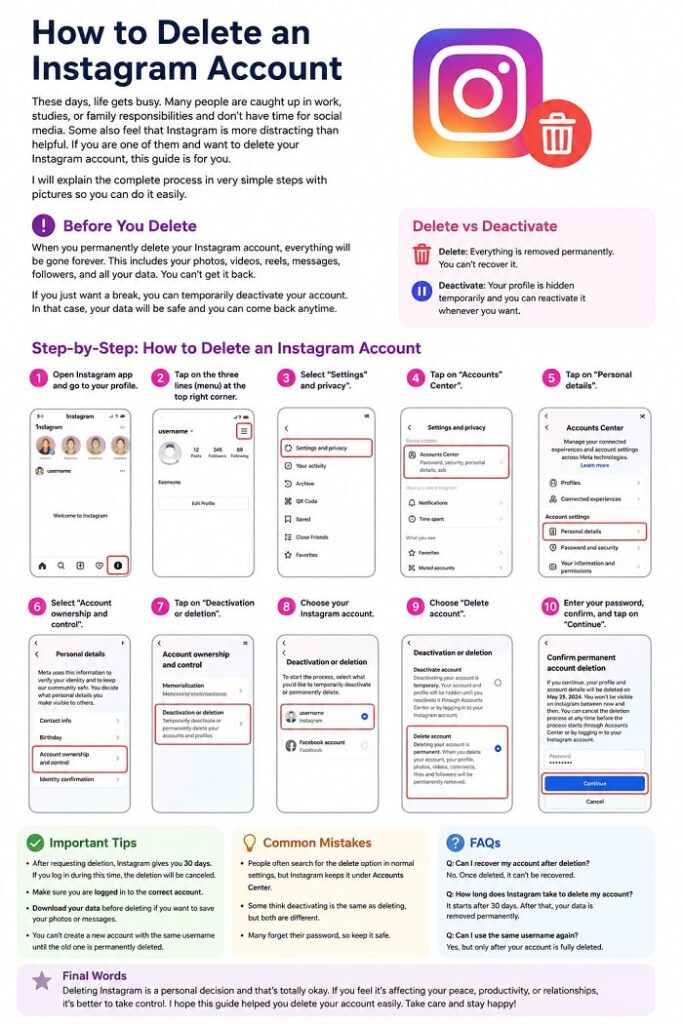
Open the Instagram app on your Android or iPhone and make sure you’re signed in to the account you want to delete. If you have more than one account, switch to the correct one before continuing.
Step 2: Go to Your Profile
Tap your profile picture in the bottom-right corner of the screen. This will open your Instagram profile. Look at the top-right corner and tap the three horizontal lines (☰). A menu with several options will appear.
Tap Settings and activity. This is where Instagram keeps all account-related settings. Inside Accounts Center, tap Personal details. You’ll now see more options related to your account information.
Tap Account ownership and control. Instagram uses this section for account management, including deactivation and permanent deletion. Now select Deactivation or deletion. If multiple Instagram accounts are connected, choose the account you want to remove. On the next screen, Instagram will show two options.
Deactivate account – This hides your profile temporarily. Delete account – This permanently removes your account and all its data.
Step 3 Choose Delete account
Choose Delete account and tap Continue. In the next section, we’ll complete the final confirmation, explain what happens after submitting your request, and show you how to cancel the deletion if you change your mind.
Confirm Your Account Deletion
After tapping Continue, Instagram will ask why you want to delete your account. Don’t spend too much time thinking about this step. Simply choose the reason that matches your situation and continue. This answer is only used by Instagram to understand why people leave the platform. Next, Instagram will ask you to enter your account password. This is a security step to make sure that the real account owner is requesting the deletion.
Once your password is accepted, tap Continue again. You’ll now see one final confirmation screen. Read the message carefully before pressing the final button. If you’re completely sure, confirm your request.Your account won’t disappear immediately. Instead, Instagram places it in a waiting period before permanently removing it.
See More: How To Delete Easypaisa Account
Final Thoughts
Social media should make life easier, not more stressful. If Instagram is taking too much of your time or no longer serves a purpose, deleting your account can be a positive decision. I hope this guide helped you understand every step clearly. If you know someone who’s looking for the same solution, feel free to share this guide with them.